There are four steps to successfully cleaning printed circuit boards (PCBs): wet, scrub, rinse and dry. Wet the board with a pure cleaning fluid; scrub it using a good quality scrubbing brush; rinse it with more clean fluid; then, dry it.
Typically there is consistent focus on the first three steps, but the critically-important drying step is often overlooked or even forgotten. For reliable performance and longevity, PCBs must be clean and dry. If moisture stays on PCB surfaces it can lead to problems including component corrosion, electrochemical migration, dendrite growth and board delamination. Leftover moisture may also outgas during soldering, creating blowholes or preventing proper coating adhesion during conformal coating operations.
Modern PCBs are often densely populated with bottom termination components, like land grid arrays and QFN (quad-flat no-leads). The very tight standoff heights of these components often trap moisture under them, making PCB drying more complicated.
Equally, the PCBs inside today’s wearable medical devices are often densely populated to keep them smaller, lighter, less invasive and more discrete for patients to wear. Bottom termination components like land grid arrays and QFN (quad-flat no-leads) have very tight standoff heights that often trap moisture under them, making cleaning and drying these miniature, multifaceted PCBs difficult. In addition, modern wearable medical devices have delicate parts often made with varied materials. Softer plastics and lightweight metals can be easily damaged, so cleaning and drying must be done carefully to prevent harm.
The right drying method
There are different ways to dry PCBs; which one to employ often depends on the cleaning method used. So, whether it is heat, air, vapour, wipes or compressed gas, there is a method to help ensure PCBs are dry and ready to provide optimum performance and reliability:
Batch drying for aqueous cleaning
Batch or bulk drying typically occurs after PCBs undergo water cleaning inside aqueous cleaning machines. PCBs cleaned with water typically require intensive drying methods. These include convection drying ovens, heated blowers and air knives to displace and evaporate the water.
However, temperature and air flow must be carefully monitored when using these drying methods. For example, if the circulating air flow isn’t strong enough or if the temperature isn’t high enough in the convection oven, it might not reach the water under the low-mounted components, leaving moisture and residue behind. Or if the temperature is too high, or the air flow too powerful, it could cause surface damage to the PCBs by baking on any leftover, residual contaminants.
Batch drying with vapour a degreaser
Vapour degreaser cleaning and drying is an affordable and convenient alternative to using aqueous cleaning machines and drying ovens. Vapour degreasing uses cleaning fluid immersion, combined with vapour rinsing and vapour drying, to remove all types of PCB contaminants including fluxes, pastes and particulate without the risks associated with aqueous cleaning and drying methods.
Vapour degreasing uses nonflammable cleaning fluids in specially-engineered vapour-degreasing cleaning machines. The vapour degreaser boils the cleaning fluid at a low temperature, usually between 40˚C/105˚F and 65°C/165°F, to produce a pure, clear and dense vapour blanket. PCBs lower into the boiling cleaning fluid to heat, loosen and remove the majority of the contamination. They then move to the rinse area where any final vestige of contamination rinses away. Finally, the PCBs raise up and sit inside the vapour blanket, where the PCBs dry and cool.
The PCBs dry quickly as the vapour passes under the low-mounted components, allowing the PCBs to exit the vapour degreaser in just 8-15 minutes after the cleaning cycle begins.
Manual drying on the benchtop, with wipes
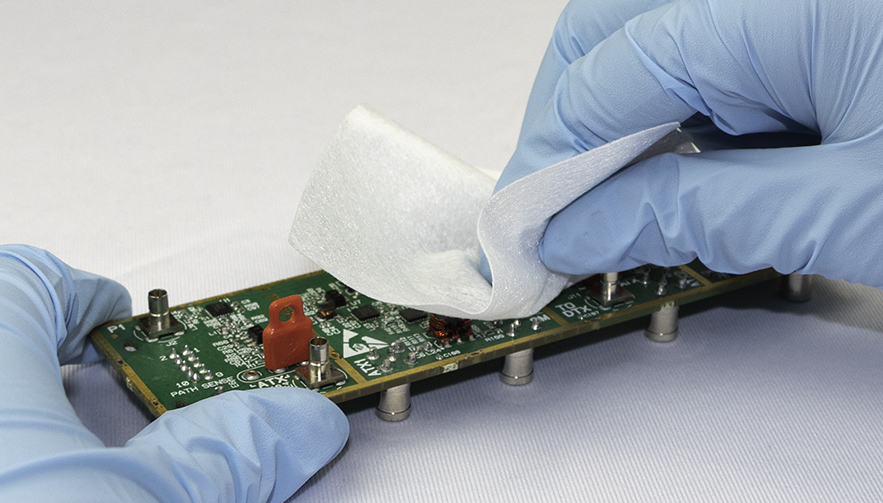
Wipes are some of the most common drying tools used during manual PCB cleaning at the benchtop. Whether capturing the excess spray of flux remover or gently pushing the wipes under low-surface mounted components to absorb cleaning fluids and contaminants, wipes are quick and effective at drying PCBs, without leaving lint or fuzz behind. However, not all wipes are the same and should be chosen carefully. Three things to consider are absorbency, material and packaging.
- Absorbency: It is important to check the wipe will absorb the specific moisture encountered. For example, some wipes are made to absorb cleaning fluids, but will not absorb water, whilst others excel at absorbing oils. So, it is essential to match the type of wipe absorbency to the contamination to be removed.
- Material. Lint-free, non-woven wipes are one of the best choices for drying PCBs because they are made without glues or binders that could leave residue or foreign object debris behind.
- Packaging. When choosing drying wipes, packaging is important. For example, wipes sealed in electrostatic-discharge-safe wrappers will limit dust attraction and reduce static discharge damage to the PCBs. In some cases, fabricators may need clean room wipes for maximum cleanliness. Clean-room wipes are typically cut and packaged in a clean-room environment to ensure their purity.
Dust removers for drying
Some fabricators choose to use dust removers, also known as dusters, to dry PCBs at the benchtop. A quick blast from a duster blows trapped moisture from underneath larger components that a wipe alone might not reach. The dust remover can also target smaller areas on PCBs to get into the hard-to-reach nooks and crannies. Using a duster in combination with a wipe doubles the drying power and prevents the cleaning fluid from being pushed back onto the board and spreading any residual contaminant around.
However, dusters must be chosen and used with caution. Safety is key. Inexpensive canned air is readily available from many retail outlets; however, some of these formulations may pose a hazard due to their high flammability ratings. A safer alternative is to use a dust remover made with non-flammable gas. Using the duster may also take a little bit of practice, but once the operator understands the velocity of the high-purity gas, the moisture is blown away quickly and efficiently without damaging the PCB or leaving residue behind.
Avoid negative impact
Moisture left on the today’s modern PCBs may negatively impact their function, reliability and longevity. Water or cleaning fluid left behind after rinsing may cause defects that could render the PCBs unusable. To prevent these problems from occurring it is imperative that PCBs are completely dry after cleaning.
It is recommended to work with a partner with specialised experience and expertise in PCB cleaning and drying to choose the best drying method to use.
By Elizabeth Norwood, Senior Chemist, MicroCare